GunterChart brings order controls beside the chart. This guide explains where the controls are; the order, stop placement and risk amount remain your decisions.
Pick the unit you want to work in
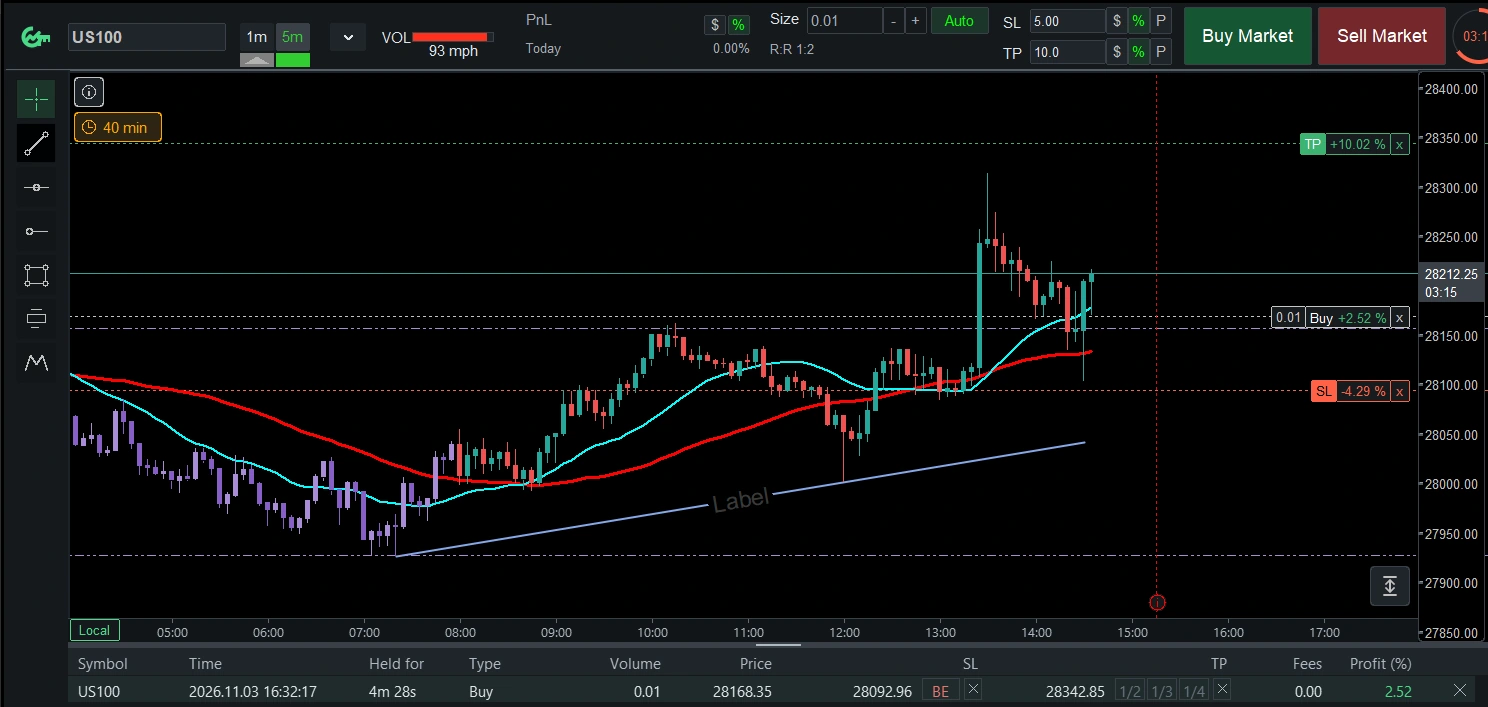
The SL and TP inputs have currency, percentage and points buttons. Choose the representation that suits your workflow, then check the displayed values before submitting an order.
Use Auto size when you want calculated volume
With Auto enabled, the volume field becomes read-only and GunterChart calculates the size using the configured risk and stop. Broker volume steps and minimums can affect the final result; always review the resulting size and stop.
Manage the order beside price
After opening an order, its chart labels show the entry, SL and TP. You can drag the stop or target on the chart. The trade manager provides break-even, partial take-profit and close controls; availability depends on the order and broker constraints.
Explore the trade-management examples for the interface in light and dark themes.
Join the conversation.
Comments are reviewed before appearing. Your email is never displayed.